Mailgun Lookup
Admin / Customers / Mailgun Lookup
Mailgun Lookup is used to troubleshoot email delivery issues. In cases of customers not receiving emails, this can be used to help investigate.
Search for an Email
There may be a delay of up to an hour for Mailgun logs to be retrieved.

You can use the following fields to help find emails:
- Sender
- Recipient
- Event Type - The status of the email
- Date From
- Date To
Both the sender and recipient fields do not perform exact matching. The easiest way to find an exact email using these fields would be by using an email address instead of common keywords for example, "smith".
Search events

Search events can be used to filter results from the original search, this works on any column.
Viewing the contents of an Email

After using the fields to filter emails, there's a button in the message column which allows you to see the content of the email.
Removing Email suppressions
This should only be used if the customer has requested for suppressions to be removed.
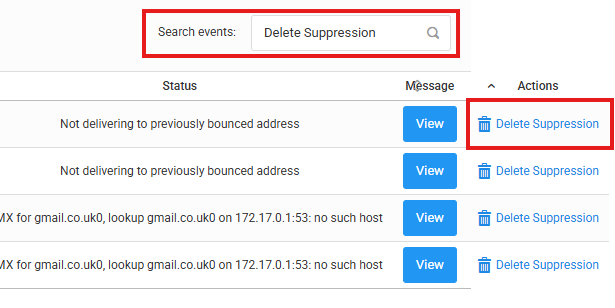
Removing an email suppression can be done by checking the actions column. If there's nothing present in the actions column, use the search events feature to find emails which have suppressions. Clicking "Delete Suppression" will allow emails to be delivered to the customer.